
Save sikit‑sikit.Watch it fill up.
SimpanLah gives every goal its own tabung. Put money aside, hear the ka-ching, see what's still free to spend until payday, and let your buddy cheer you all the way to the new phone, the Raya trip or the rainy-day fund.
For iPhone, in Malaysia. Free to download.
Sikit‑sikit,
lama-lama jadi bukit.
Little by little, it becomes a hill. That's the whole idea behind SimpanLah.
Saving that feels like a game you actually want to play
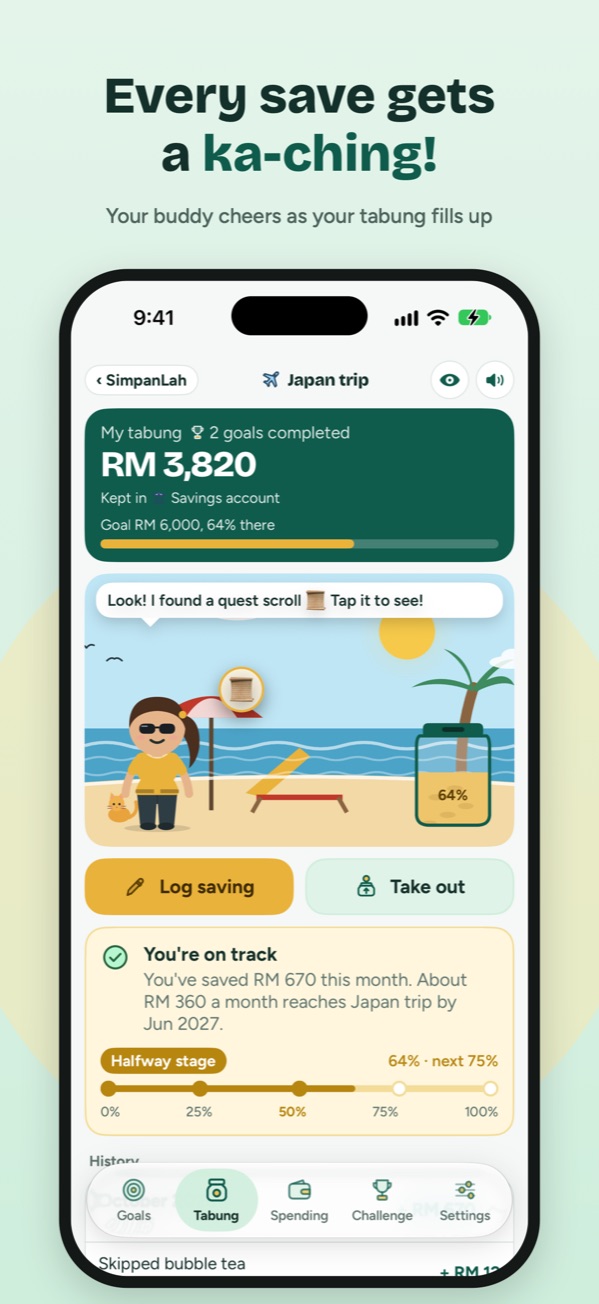
Every saving makes a sound, fills a jar and moves you closer. Here's a look inside.
Log spending
Spent it? It’s already filled in.
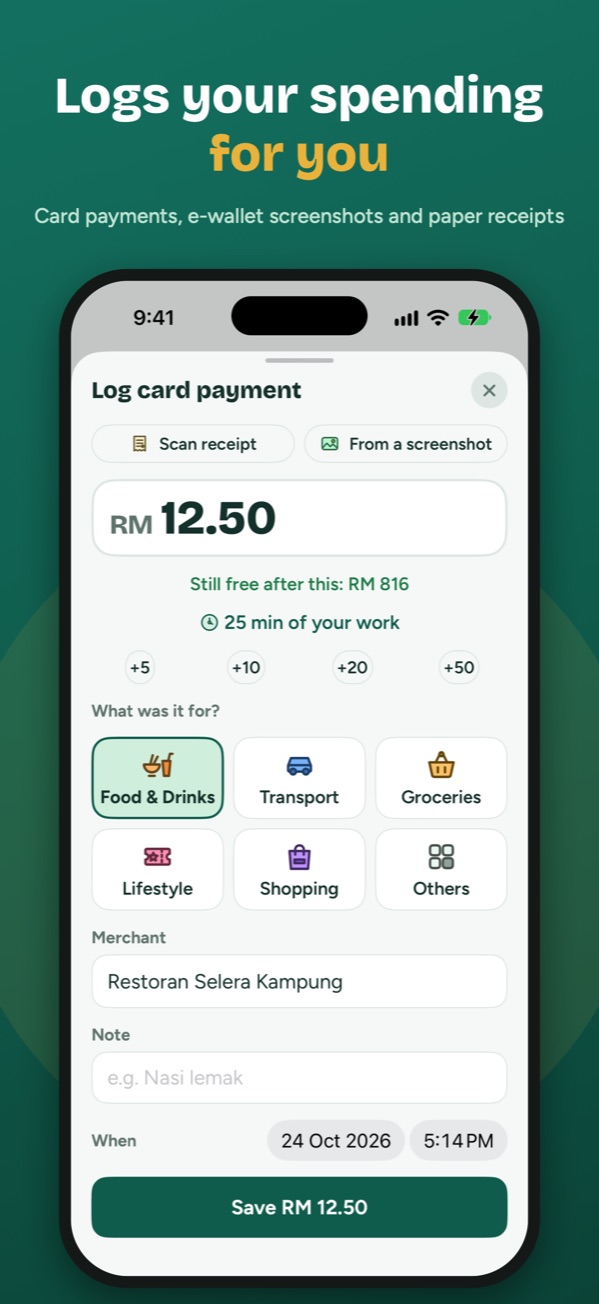
Typing in every expense is why most people give up tracking. SimpanLah fills it in for you, three ways.
On the payment screen, double-tap the back of your iPhone. SimpanLah opens with the amount, shop and date filled in. Check it, tap Save, done.
- Works with your e-wallet’s payment screen
- Read on your iPhone, never uploaded
When you pay with your iPhone or Apple Watch in a shop, SimpanLah asks “Log it?” with the amount and shop already in.
- About a minute to set up, once
- Uses Apple’s own Shortcuts app
Scan it from the Log spending sheet. SimpanLah reads the total, shop and date, and keeps the photo with the entry.
- Reads the total, shop and date
- Keeps the photo for later
You always check before anything is saved. The free plan includes 300 automatic logs a year; Premium makes it unlimited.
- SimpanLah never connects to your bank or e-wallet. Receipts and screenshots are read on your iPhone and never uploaded.
- Your goals, salary and spending stay on your iPhone and your own iCloud.
- No sign-up, no ads, no tracking in the app. We don't collect your data.
Made for how Malaysians save
Not another budgeting spreadsheet. SimpanLah is about the things you're saving for, and the small habits that get you there.
A tabung for every goal
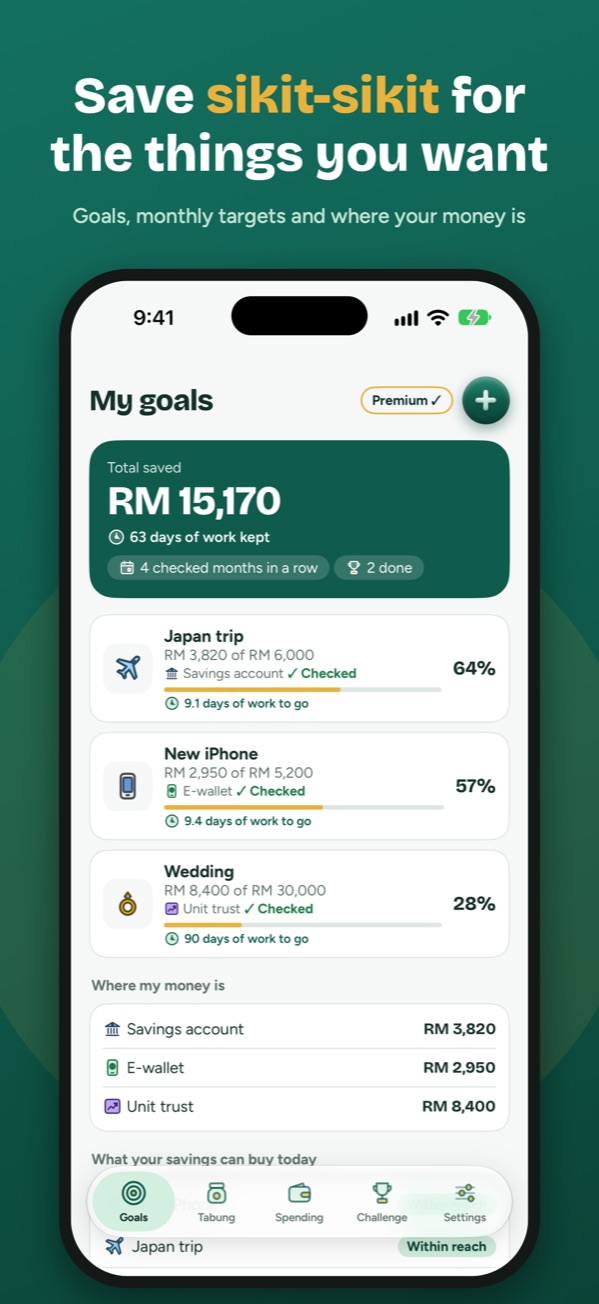
New phone, wedding, Japan trip, emergency fund. See your monthly target, whether you’re on track, and a party at 25, 50 and 75%.
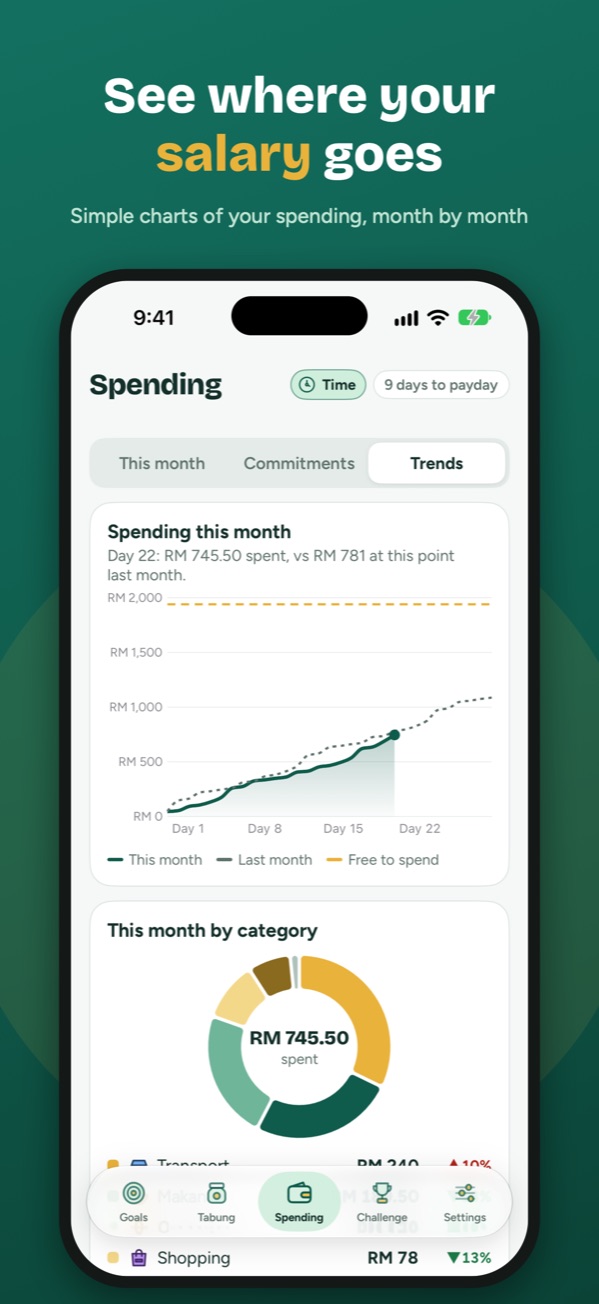
Know what’s free to spend
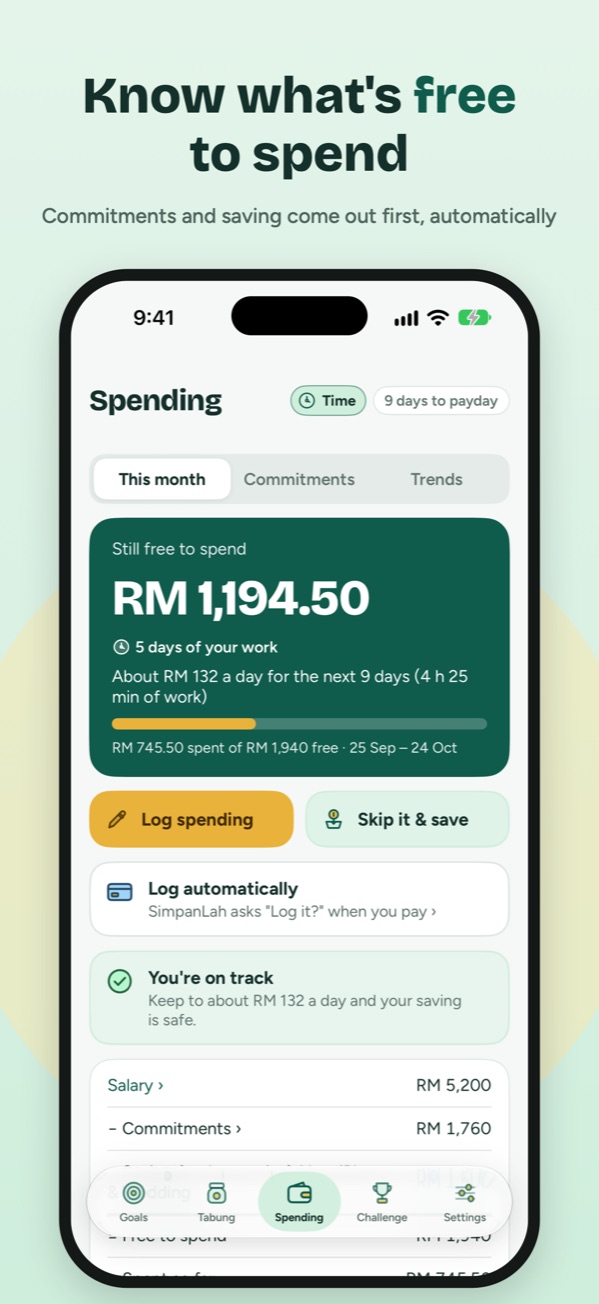
Salary in, then rent, loans, PTPTN and your saving set aside first. What’s left is free to spend until payday, as one clear number.
Logs your spending for you
Pay by card and SimpanLah asks “Log it?”. Or pick a payment screenshot or scan a receipt, and the amount, shop and date are filled in.
Honest saving
Save from a transfer screenshot or a deposit slip and it’s marked ✓ Checked. A quick monthly check keeps your savings real.
Saving, played like a game
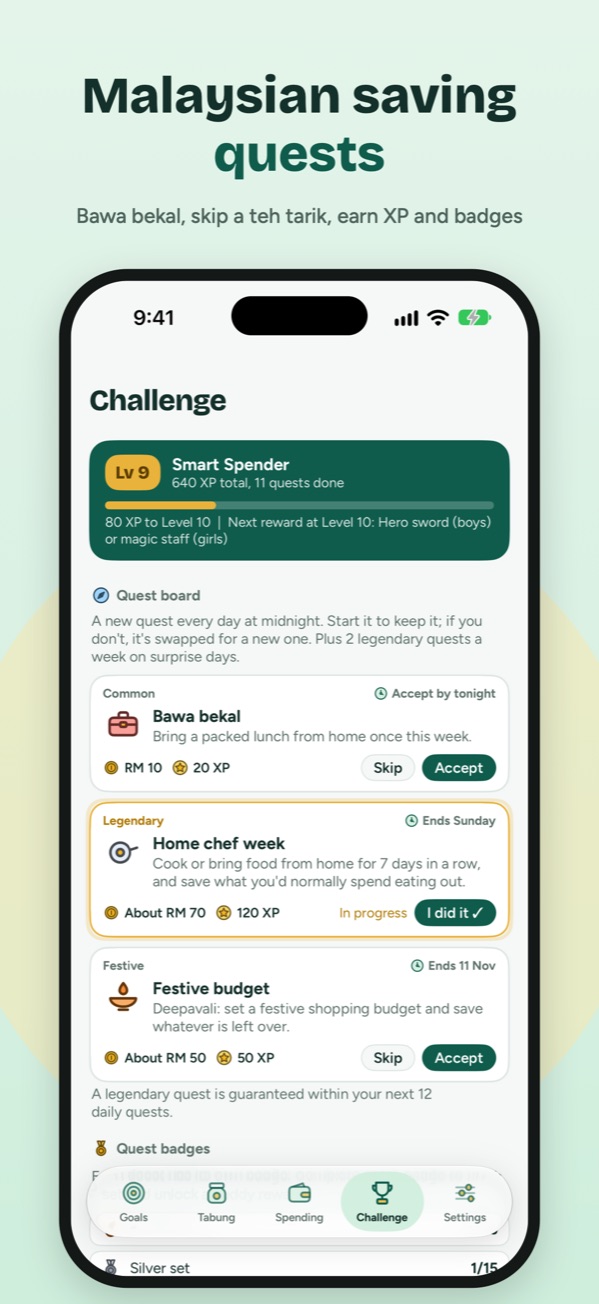
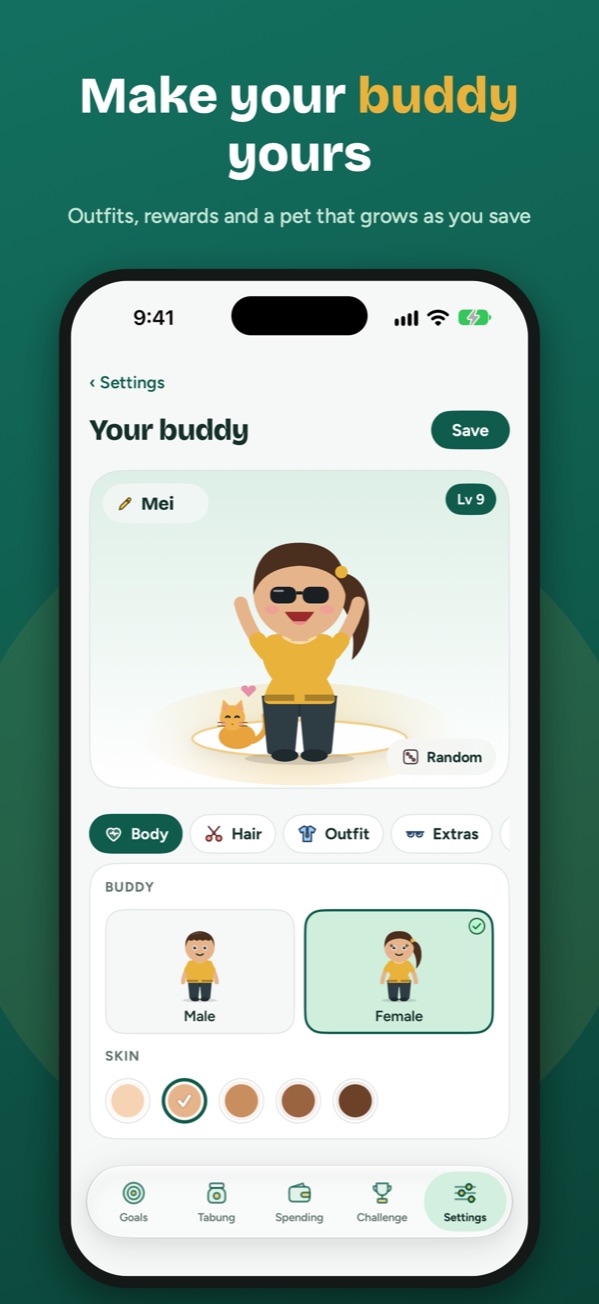
Daily saving quests, a buddy who cheers every ka-ching, badges to collect and 12 animated backgrounds.
Money as time
See amounts as hours of your work too. That RM 50 dinner? About 2 hours of work, worked out on your iPhone from your own pay.
A saving quest for every month
Monthly double-day sale quests keep impulse buys in check, and festive quests arrive right on time for the celebrations.
Plus a fresh everyday quest every midnight, like bawa bekal or coin hunt, and 2 surprise legendary quests each week, like the no-spend week. Badges go from bronze to silver to gold.
Questions
Does SimpanLah hold or move my money?
No. SimpanLah is a savings tracker and motivation app. You keep your money in your own bank, e-wallet or tabung at home, and record what you save.
Where do I get it?
On the App Store for iPhone in Malaysia, free to download.
Can SimpanLah log my spending automatically?
Yes. Card payments when you tap your iPhone or Apple Watch in a shop, e-wallet payments from a screenshot (or a double-tap on the back of your iPhone), and paper receipts with the camera. You always check before anything is saved. The free plan includes 300 automatic logs a year; Premium makes it unlimited.
Can I bring in spending I kept somewhere else?
Yes. Import an Excel or CSV file, like your own spreadsheet or a bank statement export, and check every row before it’s saved. Free imports cover up to 3 months at a time; Premium has no limit. You can also export everything to a SimpanLah file or a plain Excel file to move to a new phone, free, and open it again to restore your records.
Can I prove my saving really happened?
Yes. In a tabung, tap Log saving and pick a transfer screenshot or scan a deposit slip. SimpanLah reads the amount and date on your iPhone, keeps the picture as the receipt and marks the saving ✓ Checked.
Does SimpanLah read my bank or e-wallet?
No. It never connects to them. It only reads what you give it, like a screenshot or a receipt, and that happens on your iPhone. Nothing is uploaded.
Do I have to enter my salary?
Only if you use the Spending tab. It's needed to work out what's free to spend, and it stays private on your iPhone and your own iCloud. We never see it. Goals, tabung and quests work without it.
Is it only for Malaysia?
For now, yes. Amounts are in ringgit and the quests follow Malaysian life and festivals.
Can I try new features early?
Yes. Join the iPhone beta through Apple’s TestFlight to try the next update before everyone else. Premium is free while testing.
What happens to my data?
It stays on your phone and your own iCloud. Read the privacy policy.